
Best Resume Format for 2026: 7 Professional Resume Layouts That Get More Interviews
Choosing the best resume format for 2026 can dramatically improve your chances of getting interviews. Recruiters now spend only a few seconds scanning resumes, and most companies use ATS (Applicant Tracking Systems) to filter applications automatically.
That means your resume format matters more than ever.
In this guide, you will learn:
- The best resume formats employers prefer in 2026
- Which format works best for your experience level
- ATS-friendly resume layout tips
- Professional resume examples
- Common formatting mistakes to avoid
- Free resume templates you can use immediately
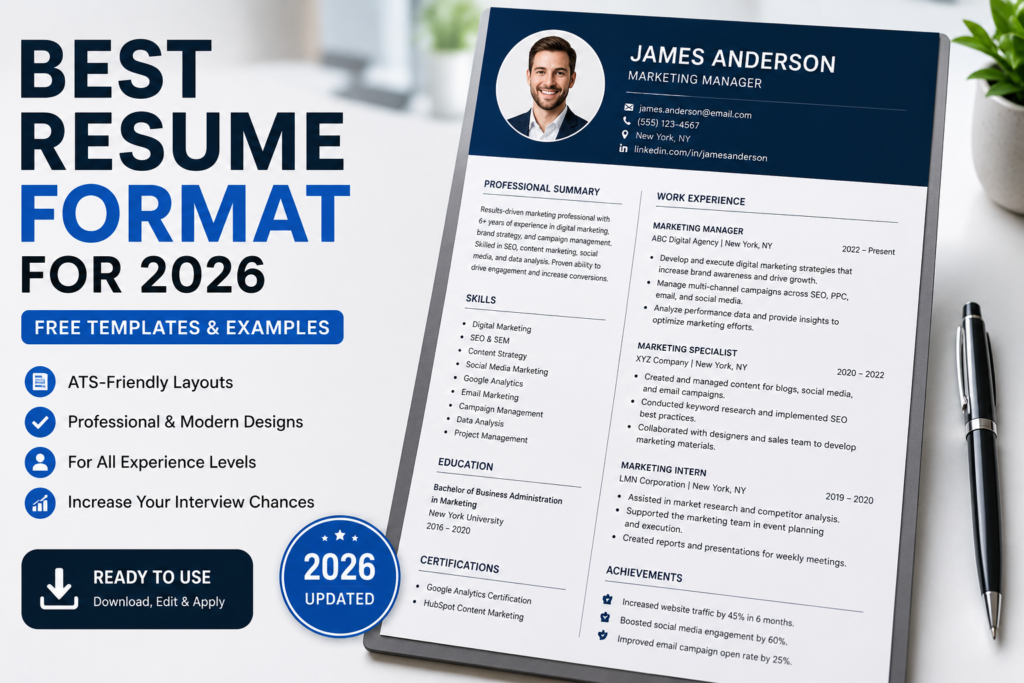
What Is the Best Resume Format for 2026?
The best resume format for 2026 is the reverse chronological resume format.
This format lists your most recent experience first and is preferred by:
- Recruiters
- Hiring managers
- ATS software
- Corporate employers
It is clean, professional, and easy to scan quickly.
The 3 Main Resume Formats Explained
1. Reverse Chronological Resume
This is the most recommended resume format for job seekers in 2026.
Best for:
- Professionals with work experience
- Corporate jobs
- Most online applications
Advantages:
- ATS-friendly
- Easy to read
- Shows career progression clearly
- Preferred by recruiters
2. Functional Resume Format
This format focuses on skills instead of work history.
Best for:
- Career changers
- Students
- People with employment gaps
Disadvantages:
- Less ATS-friendly
- Some recruiters dislike it
- Can appear vague
3. Combination Resume Format
This format mixes skills and work experience together.
Best for:
- Experienced professionals
- Technical roles
- Specialized careers
Best ATS-Friendly Resume Format for 2026
Most employers now use ATS software to scan resumes before a recruiter sees them.
To make your resume ATS-friendly:
- Use standard headings like “Experience” and “Skills”
- Avoid graphics and tables
- Use simple fonts
- Keep formatting clean
- Use keywords from the job description
- Save as PDF unless instructed otherwise
Best Resume Layout Structure
A professional resume should include these sections:
| Section | Purpose |
|---|---|
| Contact Information | Lets recruiters contact you easily |
| Professional Summary | Highlights your experience quickly |
| Work Experience | Shows achievements and career history |
| Skills | Improves ATS keyword matching |
| Education | Shows qualifications and degrees |
Best Resume Format for Students
If you have little or no experience:
- Focus on skills
- Add internships and volunteer work
- Include academic projects
- Use a strong resume summary
Keep the layout clean and simple.
Best Resume Format for Experienced Professionals
Experienced professionals should:
- Use reverse chronological format
- Highlight measurable achievements
- Include leadership experience
- Focus on career progression
- Keep the resume to 1–2 pages
Resume Formatting Tips That Improve Interviews
- Use consistent spacing
- Keep margins balanced
- Use professional fonts like Arial or Calibri
- Use bullet points instead of long paragraphs
- Prioritize achievements over responsibilities
- Keep formatting readable on mobile devices
Common Resume Format Mistakes
- Using overly designed templates
- Adding unnecessary graphics
- Using multiple fonts
- Writing huge paragraphs
- Ignoring ATS optimization
- Including outdated information
- Making the resume longer than necessary
Simple Professional Resume Example
Professional Summary Example:
Results-driven marketing specialist with experience in SEO, content marketing, social media strategy, and campaign management. Strong communication and project management skills with a proven ability to improve engagement and lead generation.
Best Fonts for Resume Formatting in 2026
- Calibri
- Arial
- Helvetica
- Cambria
- Georgia
Avoid decorative or difficult-to-read fonts.
For additional resume formatting recommendations, the
Indeed resume format guide provides useful industry-standard resume advice for job seekers.
Related Resume Guides
- How to Write a Professional Resume in 2026
- Resume Skills List for Modern Jobs
- Resume for Students With No Experience
- Resume Summary Examples for Students
- Customer Service Resume Example
- Marketing Resume Example
Frequently Asked Questions
What is the best resume format for 2026?
The reverse chronological format remains the best and most ATS-friendly resume format for 2026.
Are resume templates ATS-friendly?
Some are. Simple templates with clean formatting work best with ATS systems.
Should resumes still be one page?
For students and entry-level candidates, one page is ideal. Experienced professionals can use two pages if necessary.
What resume format do recruiters prefer?
Most recruiters prefer reverse chronological resumes because they are easy to scan quickly.
Can I use colors on my resume?
Yes, but keep them minimal and professional. Avoid heavy graphics or complicated layouts.
What file format should I use?
PDF is usually best unless the employer specifically requests a Word document.
Final Thoughts
The best resume format for 2026 is one that is clean, ATS-friendly, easy to read, and focused on achievements.
Simple professional formatting consistently outperforms flashy designs because recruiters prioritize clarity and relevance.
Choose a format that highlights your strengths clearly — and makes it easy for hiring managers to understand your value immediately.