
Home → Career Documents → ATS Resume Mistakes
10 ATS Resume Mistakes That Kill Interviews in 2026
Last Updated: May 31, 2026
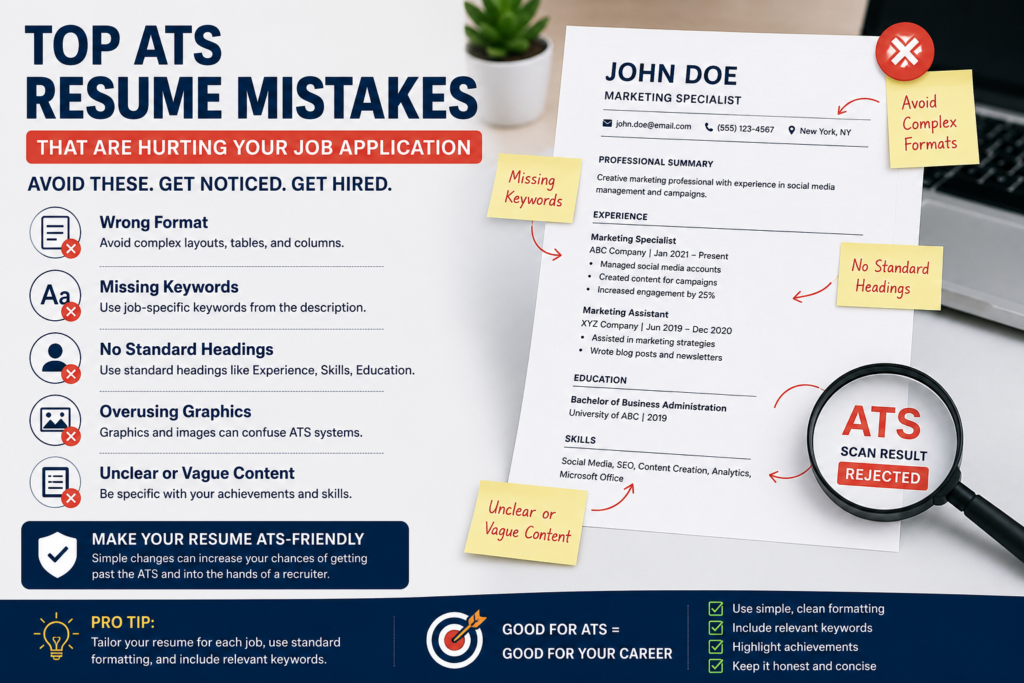
AI Overview Answer: The most common ATS resume mistakes are using complex formatting, missing job-specific keywords, placing important information inside graphics or tables, using unusual section headings, submitting the wrong file type, and failing to match the resume to the job description. To pass ATS screening in 2026, use a clean layout, standard headings, relevant keywords, measurable achievements, and a simple ATS-friendly resume format.
Your resume may look professional to a human, but that does not mean an applicant tracking system can read it correctly. Many qualified candidates lose interviews because their resumes contain formatting errors, missing keywords, vague achievements, or layout choices that confuse ATS software before a recruiter ever sees the application.
In 2026, avoiding ATS resume mistakes is essential for job seekers, especially when applying online. Most companies use some form of resume screening system to organize, filter, or rank applications. If your resume is not formatted clearly, the system may misread your experience, ignore your skills, or push your application lower in the candidate list.
This guide explains the 10 ATS resume mistakes that can hurt your job application, how to fix each one, and how to create a resume that is both ATS-friendly and recruiter-friendly.
In This Guide:
- What Is an ATS?
- Why ATS Resume Mistakes Matter
- Mistake 1: Using Complex Formatting
- Mistake 2: Missing Resume Keywords
- Mistake 3: Using Non-Standard Headings
- Mistake 4: Putting Important Text in Graphics
- Mistake 5: Submitting the Wrong File Type
- Mistake 6: Using Vague Content
- Mistake 7: Not Tailoring Your Resume
- Mistake 8: Keyword Stuffing
- Mistake 9: Ignoring Job Titles and Skills
- Mistake 10: Forgetting Human Readability
- ATS Resume Checklist
- Related Career Tools
- FAQ
✔ ATS-Friendly Tips ✔ Beginner Friendly ✔ 2026 Resume Advice ✔ Free Checklist Included
What Is an ATS?
An ATS, or applicant tracking system, is software employers use to collect, organize, and review job applications. It helps recruiters manage large numbers of resumes by storing applicant information, parsing resume content, identifying keywords, and sometimes filtering candidates based on job requirements.
An ATS does not read resumes exactly like a person. It scans structure, headings, dates, job titles, skills, and keywords. If your resume uses confusing formatting or hides information in design elements, the system may fail to understand your qualifications.
Featured Snippet Answer:
The biggest ATS resume mistakes are using complex designs, missing job-specific keywords, using non-standard section headings, adding text inside images, submitting the wrong file format, and writing vague achievements. A strong ATS resume uses simple formatting, clear headings, relevant keywords, and measurable results.
Why ATS Resume Mistakes Matter in 2026
Online applications are more competitive than ever. A single job posting can attract hundreds of applicants. Recruiters need tools to organize applications quickly, and ATS platforms help them review candidate data more efficiently.
This means your resume must do two jobs at the same time: it must be readable by software and persuasive to a human recruiter. A resume that only looks attractive but cannot be parsed correctly may never reach the person making interview decisions.
The goal is not to trick ATS software. The goal is to make your resume clear, relevant, and easy to understand. The same choices that help ATS systems read your resume often help recruiters too: clean structure, specific skills, clear job titles, and measurable achievements.
Mistake 1: Using Complex Formatting
One of the most common ATS resume mistakes is using a design-heavy layout with columns, tables, text boxes, icons, sidebars, or unusual spacing. These elements may look modern, but some ATS tools can read them in the wrong order or skip parts of the content.
Avoid: Two-column layouts, heavy graphics, decorative headers, tables for work history, icons instead of text, and important details placed in sidebars.
Fix: Use a clean, single-column layout with standard margins, simple bullet points, and clearly labeled sections.
If you want a cleaner layout, review our ATS Friendly Resume Template and Best Resume Format for 2026.
Mistake 2: Missing Resume Keywords
ATS systems often compare your resume content with the job description. If the employer asks for skills such as project management, Salesforce, Excel, customer support, Python, bookkeeping, or content strategy, those terms should appear naturally in your resume when they are true for your experience.
Many applicants describe their experience too generally. For example, “helped with reports” is weaker than “created weekly Excel reports to track sales performance.” The second version includes a specific tool, task, and business context.
Weak:
Responsible for helping the team with data and reports.
Better:
Created weekly Excel reports to track customer activity, sales performance, and campaign results for the marketing team.
For more help, use our guide on Resume Keywords for Job Applications.
Mistake 3: Using Non-Standard Headings
Creative section names can confuse ATS systems. Headings like “My Journey,” “Career Story,” “Where I’ve Been,” or “What I Bring” may look interesting, but they are not as clear as standard resume headings.
Use headings that both ATS software and recruiters immediately understand:
- Professional Summary
- Work Experience
- Education
- Skills
- Certifications
- Projects
Standard headings make your resume easier to scan and reduce the risk of parsing errors.
Mistake 4: Putting Important Text in Graphics or Images
Some resume templates use icons, charts, rating bars, or graphic skill sections. These design elements may look attractive, but ATS software may not read them correctly. A skill shown only as an icon or bar chart may be ignored.
Example: A graphic bar showing “Excel 90%” may not be parsed as a real skill. Write “Advanced Excel” in plain text instead.
Keep all important resume information in normal text. This includes your name, phone number, email address, job titles, company names, skills, certifications, and achievements.
Mistake 5: Submitting the Wrong File Type
Many employers specify whether they want a PDF, DOC, or DOCX file. Ignoring those instructions can hurt your application. Some ATS platforms parse Word documents more easily, while others accept PDFs without problems.
The safest rule is simple: follow the job posting instructions exactly. If the employer asks for PDF, upload PDF. If they ask for DOCX, upload DOCX. If no format is specified, a clean PDF is usually acceptable, but a DOCX version can also be useful.
| File Type | When to Use It | ATS Risk |
|---|---|---|
| When the employer accepts PDF or asks for it | Low if created from text, not scanned image | |
| DOCX | When the employer asks for Word format | Low |
| Image-based PDF | Avoid for resumes | High |
| JPG/PNG | Never use unless specifically requested | Very high |
Mistake 6: Using Vague Content
ATS software can scan keywords, but recruiters still decide whether your experience is convincing. Vague statements make your resume weaker because they do not show impact.
Replace generic duties with specific achievements. Add numbers when possible: percentages, dollar amounts, time saved, customers served, projects completed, or team size.
Weak:
Worked on customer service tasks and helped clients.
Better:
Handled 40+ customer inquiries per day, resolved billing issues, and improved first-response time by 25% over three months.
For more examples, read Resume Action Verbs List and Resume Skills List for Modern Jobs.
Mistake 7: Not Tailoring Your Resume to the Job Description
Submitting the same resume to every job is one of the fastest ways to reduce your chances. ATS screening is often based on relevance. A generic resume may not include the exact skills, responsibilities, or role language that the employer is looking for.
Tailoring does not mean inventing experience. It means choosing the most relevant skills and achievements for each job. Read the job description, identify repeated requirements, and adjust your summary, skills, and bullets to match your real experience.
Use our detailed guide on How to Tailor a Resume to a Job Description for a step-by-step process.
Mistake 8: Keyword Stuffing
Keywords matter, but keyword stuffing can make your resume look unnatural. Repeating the same terms over and over without context may hurt readability and make your resume feel low quality.
Avoid: “Project management, project management, project management, project management software, project manager skills.”
Better: “Managed cross-functional projects using Asana, coordinated weekly stakeholder updates, and delivered campaign assets two weeks ahead of schedule.”
Use keywords inside real achievements. This helps ATS software identify relevance while giving recruiters proof of your ability.
Mistake 9: Ignoring Job Titles, Dates, and Skills Structure
ATS tools look for structured information. If your job titles, company names, and dates are inconsistent or hard to read, your resume may not parse correctly.
Use a simple structure like this:
Marketing Coordinator
ABC Company | January 2023 – Present
• Created weekly campaign reports using Google Analytics and Excel.
• Managed email content calendars and improved open rates by 18%.
• Coordinated social media assets for product launches.
This format is simple, readable, and easy for both ATS systems and recruiters to understand.
Mistake 10: Forgetting Human Readability
An ATS-friendly resume should not be robotic. After your resume passes screening, a recruiter still needs to read it. A resume packed with keywords but lacking clear achievements may still fail.
Balance ATS optimization with human clarity. Use short bullet points, active verbs, measurable outcomes, and natural language. Your resume should feel professional, specific, and easy to scan.
ATS Resume Checklist
Use this checklist before applying online.
- Use a clean, single-column resume layout.
- Use standard headings such as Work Experience, Education, Skills, and Certifications.
- Include job-specific keywords from the job description.
- Write achievements with numbers where possible.
- Avoid tables, text boxes, icons, and image-based text.
- Use simple fonts such as Arial, Calibri, or Times New Roman.
- Save the file type requested in the job posting.
- Make sure your contact information is in plain text.
- Tailor your resume for each role.
- Proofread before submitting.
ATS Resume Mistakes: Quick Comparison Table
| Mistake | Why It Hurts | Better Option |
|---|---|---|
| Complex formatting | ATS may read sections incorrectly | Use a clean single-column layout |
| Missing keywords | Resume may not match job requirements | Use relevant terms from the job description |
| Creative headings | ATS may not recognize sections | Use standard headings |
| Text inside images | Important information may be skipped | Use plain text |
| Wrong file type | Resume may not parse properly | Follow employer instructions |
| Vague achievements | Recruiters cannot see impact | Add metrics and specific results |
Create an ATS-Friendly Resume Faster
Need a resume that is clean, structured, and easier to scan? Use our free AI tools to create better career documents in minutes.
Related Career Tools and Guides
External Resource
For additional career and employment research, visit the U.S. Bureau of Labor Statistics.
FAQ: ATS Resume Mistakes
What are the biggest ATS resume mistakes?
The biggest ATS resume mistakes include complex formatting, missing keywords, non-standard headings, text inside images, incorrect file types, vague achievements, and submitting the same resume to every job.
What resume format is best for ATS?
The best ATS resume format is a clean, single-column layout with standard headings, simple fonts, clear bullet points, and plain text contact information.
Can ATS read PDF resumes?
Many ATS systems can read text-based PDFs, but you should always follow the employer’s file instructions. Avoid scanned or image-based PDFs.
Do tables hurt ATS resumes?
Tables can cause parsing problems in some ATS systems. It is safer to use simple text sections instead of tables for important resume content.
How do I find ATS keywords?
Read the job description and identify repeated skills, tools, job duties, certifications, and industry terms. Use those keywords naturally when they match your real experience.
Is keyword stuffing bad for resumes?
Yes. Keyword stuffing makes a resume harder to read and can look unprofessional. Use keywords inside real achievements and relevant experience.
Should my resume have graphics or icons?
For online applications, avoid important information in graphics or icons. Use plain text so both ATS software and recruiters can read your resume correctly.
How often should I tailor my resume?
You should tailor your resume for every serious job application. Adjust your summary, skills, and bullet points to match the role while keeping everything truthful.
Can a resume pass ATS and still look professional?
Yes. A resume can be clean, modern, and ATS-friendly at the same time. Use strong spacing, clear headings, simple fonts, and specific achievements.
What is the safest ATS resume layout?
The safest layout is a simple one-column resume with sections for Professional Summary, Skills, Work Experience, Education, and Certifications.
Fix Your Resume Before You Apply
Before sending your next application, review your formatting, keywords, headings, and achievements. Small ATS-friendly changes can help your resume reach more recruiters.
Author
InstantDocsAI Editorial Team
Our career document guides help job seekers create stronger resumes, cover letters, professional emails, resignation letters, and workplace documents using clear examples, practical templates, and AI-assisted writing workflows.