
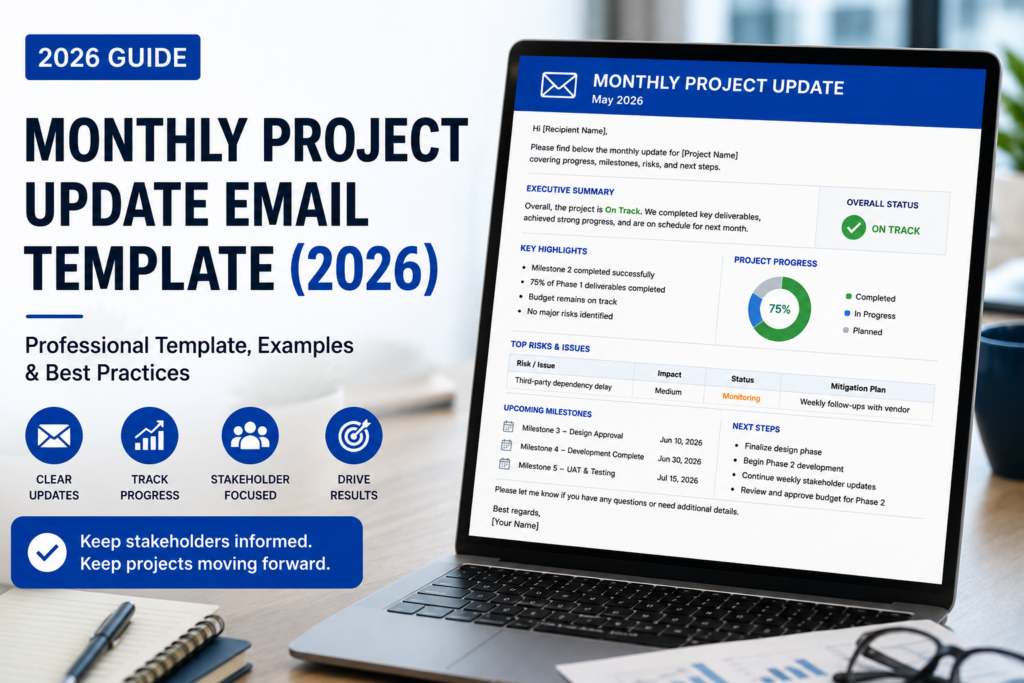
Monthly Project Update Email Template (2026): Free Examples, Format & Best Practices
Last Updated: June 2026
A professional Monthly Project Update Email Template helps project managers, consultants, agencies, freelancers, team leads, and business owners summarize project progress in a clear monthly format. Instead of sending scattered updates across meetings, chat messages, and spreadsheets, a monthly project update email gives stakeholders one structured overview of what happened, what changed, what needs attention, and what comes next.
Monthly project updates are especially useful for long-term projects, client retainers, executive reporting, marketing campaigns, software development, construction projects, consulting engagements, and cross-functional business initiatives. A strong Monthly Project Update Email Template keeps everyone aligned without overwhelming recipients with daily task-level detail.
This guide includes a complete monthly project update email template, client and executive examples, subject lines, comparison tables, project health reporting sections, common mistakes, best practices, and a checklist you can use before sending your next monthly update.
Table of Contents
- Featured Snippet Answer
- AI Overview Answer
- What Is a Monthly Project Update Email?
- Why Monthly Project Update Emails Matter
- Monthly Project Update Email vs Weekly Project Status Email
- Monthly Project Update Email Structure
- Free Monthly Project Update Email Template
- Client Monthly Project Update Email Template
- Executive Monthly Project Update Email Template
- Monthly Project Update Email Examples
- Best Subject Lines
- Monthly Project Health Table
- Monthly Project Update Summary Table
- Common Mistakes
- Best Practices
- Checklist
- Frequently Asked Questions
Featured Snippet Answer
A Monthly Project Update Email Template is a structured email used to summarize a project’s progress over the past month. It usually includes the project name, reporting period, overall status, completed milestones, key results, risks, blockers, budget or timeline changes, decisions needed, and next month’s priorities.
AI Overview Answer
A Monthly Project Update Email Template helps stakeholders understand long-term project progress without reading every weekly detail. The best monthly update emails include an executive summary, project health status, completed work, measurable results, budget and timeline notes, risks, decisions needed, and next month’s action plan. They are ideal for clients, executives, leadership teams, and long-term project stakeholders.
What Is a Monthly Project Update Email?
A monthly project update email is a professional status message sent once per month to summarize a project’s progress, outcomes, risks, and upcoming priorities. A Monthly Project Update Email Template gives this message a consistent structure so every update is easy to read, compare, and act on.
Monthly project emails are different from short daily updates or weekly task reports. They are broader, more strategic, and more focused on progress over time. Instead of listing every small task, a monthly update should highlight results, milestones, delays, budget changes, stakeholder decisions, and next-month priorities.
For long-term work, monthly project updates create a reliable communication rhythm. Clients know when to expect progress summaries. Executives can scan project health quickly. Internal teams can see how their work connects to larger goals.
Who Should Send Monthly Project Update Emails?
- Project managers
- Account managers
- Consultants
- Marketing agencies
- Software development teams
- Construction coordinators
- Freelancers managing retainers
- Operations leaders
- Client success managers
- Executive assistants supporting strategic projects
For related shorter update formats, see Project Update Email Example and Weekly Project Status Email Example.
Why Monthly Project Update Emails Matter
A Monthly Project Update Email Template matters because it gives stakeholders a clear, recurring summary of project progress. It reduces confusion, prevents hidden risks, documents decisions, and keeps clients or executives informed without requiring unnecessary meetings.
Monthly updates are especially valuable when projects are long, complex, or spread across several teams. Without a monthly summary, stakeholders may only see fragments of progress. This can lead to repeated questions, duplicated work, delayed approvals, and misaligned expectations.
Main Benefits
- Creates a professional written record of monthly progress
- Summarizes key achievements without excessive detail
- Helps executives understand project health quickly
- Builds client trust through consistent communication
- Highlights risks before they become larger problems
- Clarifies next month’s priorities
- Reduces unnecessary update meetings
- Makes long-term projects easier to manage
Monthly Project Update Email vs Weekly Project Status Email
A monthly project update email is broader and more strategic than a weekly status email. Weekly updates usually focus on recent tasks, blockers, and next-week priorities, while monthly updates summarize overall progress, outcomes, trends, and decisions.
| Feature | Monthly Project Update Email | Weekly Project Status Email |
|---|---|---|
| Purpose | Summarizes monthly progress and strategic direction | Reports short-term progress and immediate blockers |
| Audience | Executives, clients, stakeholders, leadership | Project teams, managers, active stakeholders |
| Detail Level | High-level summary | Task-level or milestone-level detail |
| Best For | Long projects, retainers, executive reporting | Active work, sprint updates, deadline tracking |
| Typical Length | 300–600 words | 150–400 words |
If you need a more detailed reporting format, use the Project Status Report Email Template. For client-facing updates, see Client Project Update Email Template.
Monthly Project Update Email Structure
A strong Monthly Project Update Email Template should follow a simple structure: subject line, greeting, executive summary, overall project status, completed work, results, risks, decisions needed, next month’s priorities, and closing.
1. Subject Line
Use the project name, month, and update type. Example: “Project Atlas — Monthly Update | June 2026.”
2. Executive Summary
Start with a short summary that explains the overall project condition and key takeaway from the month.
3. Overall Status
Use clear status labels such as On Track, At Risk, Delayed, Needs Decision, or Complete.
4. Key Accomplishments
Summarize the most important work completed during the month. Focus on outcomes, not every task.
5. Metrics and Results
Include measurable progress where possible: milestones completed, budget used, timeline changes, deliverables approved, or performance results.
6. Risks and Blockers
List any risks, delays, dependencies, approvals, or resource constraints that could affect the next month.
7. Priorities for Next Month
End with what will happen next and what decisions or actions are needed.
Free Monthly Project Update Email Template
Use this Monthly Project Update Email Template for long-term projects, client retainers, executive reporting, agency work, marketing campaigns, consulting projects, and internal business initiatives.
Subject: [Project Name] — Monthly Project Update | [Month Year]
Hi [Recipient Name / Team],
Here is the monthly update for [Project Name] covering [Month Year].
Overall Status: [On Track / At Risk / Delayed / Complete]
Executive Summary:
[Briefly summarize the most important project progress, key result, and any item requiring attention.]
Key Accomplishments This Month:
- [Accomplishment 1]
- [Accomplishment 2]
- [Accomplishment 3]
Current Project Health:
- Timeline: [On Track / At Risk / Delayed]
- Budget: [On Track / At Risk / Over Budget]
- Scope: [Stable / Changed / Needs Review]
- Risks: [Low / Medium / High]
Risks or Blockers:
- [Risk or blocker] — Impact: [Impact] — Recommended action: [Action]
Decisions Needed:
- [Decision needed] — Owner: [Name] — Needed by: [Date]
Priorities for Next Month:
- [Priority 1]
- [Priority 2]
- [Priority 3]
Please review this update and reply with any questions or approvals by [Date].
Best regards,
[Your Name]
Client Monthly Project Update Email Template
A client-facing Monthly Project Update Email Template should be polished, concise, and outcome-focused. Clients want to know what was completed, what is in progress, whether the timeline is safe, and what they need to provide.
Subject: [Client Project Name] — Monthly Update | [Month Year]
Hi [Client Name],
I’m sharing the monthly update for [Project Name]. Overall, the project is currently [On Track / At Risk / Delayed].
Completed This Month:
- [Completed deliverable 1]
- [Completed deliverable 2]
- [Completed deliverable 3]
Current Focus:
- [Current work item 1]
- [Current work item 2]
Timeline Update:
[Briefly explain whether the timeline has changed.]
Items Needed From You:
- [Approval / feedback / file / decision] — Needed by: [Date]
Next Month’s Priorities:
- [Priority 1]
- [Priority 2]
- [Priority 3]
Please let me know if you have questions or would like to discuss any item in more detail.
Best regards,
[Your Name]
Executive Monthly Project Update Email Template
An executive Monthly Project Update Email Template should be short, strategic, and decision-ready. Executives usually want project health, business impact, risks, budget status, and decisions needed.
Subject: Executive Monthly Update — [Project Name] | [Month Year]
Hi [Executive Name],
Below is the monthly executive update for [Project Name].
Executive Summary:
[Summarize project health, business impact, and any decision needed in 2–3 sentences.]
Overall Status: [On Track / At Risk / Delayed]
Business Impact: [Brief impact statement]
Key Results This Month:
- [Result 1]
- [Result 2]
- [Result 3]
Risks Requiring Attention:
- [Risk] — Impact: [Impact] — Recommendation: [Recommendation]
Decision Needed: [Decision and deadline]
Next Update: [Date]
Best regards,
[Your Name]
For senior leadership communication, also see Executive Project Update Email Template and Project Update Email Subject Lines.
Monthly Project Update Email Examples
Use these examples to adapt your Monthly Project Update Email Template for different project types.
Marketing Campaign Monthly Update Example
Subject: Q3 Campaign — Monthly Update | June 2026
Hi Team,
The Q3 campaign remains on track. This month, we completed landing page copy, finalized paid ad creative, and approved the first email sequence. The main priority for next month is campaign launch preparation and final analytics tracking setup.
Software Project Monthly Update Example
Subject: Product Dashboard — Monthly Project Update
Hi Stakeholders,
The dashboard project is at risk due to delayed QA testing. Feature development is 85% complete, but release timing depends on resolving three open bugs and finalizing user acceptance testing by July 10.
Construction Monthly Update Example
Subject: Oak Street Renovation — June Monthly Update
Hi Team,
The renovation project is on track. Framing, electrical rough-in, and HVAC inspection were completed this month. Next month’s priorities are drywall installation, interior finishes, and final vendor scheduling.
Consulting Monthly Update Example
Subject: Operations Review — Monthly Update | Phase 2
Hi [Client Name],
Phase 2 is progressing as planned. This month, we completed workflow interviews, mapped current bottlenecks, and drafted preliminary recommendations. Next month, we will review findings with department leads and finalize the implementation plan.
Best Monthly Project Update Email Subject Lines
The subject line for a Monthly Project Update Email Template should include the project name, month, and update type. Add “Action Needed” only when a decision is required.
- [Project Name] — Monthly Project Update | [Month Year]
- [Project Name] — June 2026 Progress Summary
- Monthly Update: [Project Name]
- [Client Name] Project — Monthly Status Summary
- [Project Name] — Monthly Executive Update
- [Project Name] — Progress, Risks & Next Steps
- Action Needed: [Project Name] Monthly Update
- [Project Name] — Monthly Report and Priorities
- [Project Name] — Timeline and Budget Update
- [Project Name] — End-of-Month Project Summary
- [Project Name] — Monthly Stakeholder Update
- [Project Name] — This Month’s Progress and Next Steps
For more options, see Email Subject Lines for Work.
Monthly Project Health Table
Adding a project health table to your Monthly Project Update Email Template helps stakeholders quickly understand the condition of the project.
| Area | Status | Notes |
|---|---|---|
| Timeline | On Track / At Risk / Delayed | Explain schedule impact briefly. |
| Budget | On Budget / At Risk / Over Budget | Mention budget variance if relevant. |
| Scope | Stable / Changed / Needs Approval | Flag scope changes clearly. |
| Resources | Stable / Limited / Needs Support | Mention staffing or vendor constraints. |
| Risk Level | Low / Medium / High | Summarize top risk. |
Monthly Project Update Summary Table
Use this summary table to decide what your monthly update should include.
| Section | Purpose | Recommended Length |
|---|---|---|
| Executive Summary | Gives high-level context | 2–3 sentences |
| Key Accomplishments | Shows completed work | 3–5 bullets |
| Risks and Blockers | Highlights issues early | 1–4 bullets |
| Decisions Needed | Requests stakeholder action | Clear and specific |
| Next Month’s Priorities | Sets expectations | 3–5 bullets |
Common Monthly Project Update Email Mistakes
Common mistakes include sending vague summaries, hiding risks, listing too many minor tasks, forgetting decisions needed, and failing to explain what will happen next month.
- Writing a task dump instead of a summary: Monthly updates should focus on meaningful progress, not every small task.
- Forgetting the project health status: Always show whether the project is on track, at risk, or delayed.
- Hiding bad news: If something is delayed, explain it early and calmly.
- Leaving out decisions needed: Monthly updates should make approvals and decisions obvious.
- Using vague timing: Replace “soon” with specific dates.
- Not adapting to the audience: Executives need strategic summaries; teams need more operational detail.
- Sending inconsistent formats: Use the same structure each month so stakeholders know where to look.
Best Practices for Monthly Project Update Emails
The best Monthly Project Update Email Template is consistent, concise, honest, and action-oriented. It should give readers a clear view of progress without making them search through documents or meetings. The Project Management Institute guidance on effective status reporting also emphasizes tailoring the level of detail to the audience and highlighting the information stakeholders actually need.
- Send the update on the same date each month.
- Use a consistent format every time.
- Start with a short executive summary.
- Include the project health status near the top.
- Summarize outcomes, not just tasks.
- Use bullet points for easy scanning.
- Flag risks and blockers clearly.
- Separate completed work from next month’s priorities.
- Use exact dates for decisions and approvals.
- End with one clear call to action.
For general email clarity, read Professional Email Writing Tips for Work. For meeting follow-up communication, see Follow Up Email After Meeting.
Monthly Project Update Email Checklist
Before sending your Monthly Project Update Email Template, review this checklist.
| Checklist Item | Done? |
|---|---|
| Project name is in the subject line | Yes / No |
| Month and reporting period are clear | Yes / No |
| Executive summary is included | Yes / No |
| Overall project health is visible near the top | Yes / No |
| Key accomplishments are summarized | Yes / No |
| Risks and blockers are explained clearly | Yes / No |
| Decisions needed include owners and deadlines | Yes / No |
| Next month’s priorities are listed | Yes / No |
| Email ends with one clear CTA | Yes / No |
Expert Insight
Monthly project updates work best when they connect details to decisions. Stakeholders do not need a list of every task completed. They need to know whether the project is healthy, whether results are being achieved, whether risks exist, and whether they need to take action. A strong Monthly Project Update Email Template keeps that decision-making purpose at the center.
Practical Recommendation
Create one standard monthly update format and use it across all long-term projects. This helps clients and executives compare updates month over month. Save separate versions for client updates, executive updates, and internal team updates so the level of detail always matches the audience.
Real-World Example
A digital agency managing multiple client retainers noticed that clients kept asking for repeated progress updates throughout the month. The agency introduced a standard monthly project update email with completed work, results, blockers, and next-month priorities. Within two months, clients asked fewer repeated questions, approvals became faster, and account managers spent less time explaining project status manually.
Sources
Frequently Asked Questions
What is a Monthly Project Update Email Template?
A Monthly Project Update Email Template is a structured email format used to summarize a project’s monthly progress, completed work, risks, blockers, decisions needed, and priorities for the next month.
What should a monthly project update email include?
It should include the project name, reporting month, executive summary, overall status, key accomplishments, project health, risks, blockers, decisions needed, next month’s priorities, and a clear call to action.
How long should a monthly project update email be?
Most monthly project update emails should be 300 to 600 words. Executive updates should be shorter, while client or internal reports may include more detail when needed.
How is a monthly project update different from a weekly status update?
A monthly update is broader and focuses on overall progress, outcomes, risks, and next-month priorities. A weekly status update is more tactical and focuses on recent tasks, immediate blockers, and upcoming deadlines.
Who should receive a monthly project update email?
Monthly updates are useful for clients, executives, project sponsors, department leaders, account managers, internal teams, vendors, and any stakeholder who needs a regular summary of project progress.
What is a good subject line for a monthly project update email?
A good subject line includes the project name and month. Example: “Project Atlas — Monthly Project Update | June 2026.” Add “Action Needed” only when the recipient must respond.
Should a monthly project update include risks?
Yes. Risks should be included clearly and early. A monthly update should explain the risk, impact, recommended action, and whether a stakeholder decision is needed.
Can I use a monthly project update email for clients?
Yes. Client monthly updates are very useful for retainers, consulting projects, agencies, web design projects, marketing campaigns, and long-term service relationships.
Can AI help write monthly project update emails?
Yes. AI can help summarize notes, organize updates, draft professional wording, and create clear sections. Always verify project facts, dates, metrics, and decisions before sending.
What is the best format for a monthly project update email?
The best format includes a subject line, short greeting, executive summary, overall status, completed work, project health, risks, decisions needed, next month’s priorities, and one clear next step.
Create Monthly Project Update Emails Faster
Need a custom Monthly Project Update Email Template for your client, team, or executive report? Use the InstantDocsAI Professional Email Writer to generate polished project updates, status summaries, client emails, stakeholder reports, and executive messages in seconds.
Final Thoughts
A strong Monthly Project Update Email Template gives stakeholders the clarity they need without overwhelming them with daily details. It summarizes progress, documents risks, highlights decisions, and sets expectations for the next month.
Use a consistent monthly project update email format for clients, executives, leadership teams, and internal project reporting. The clearer your monthly updates are, the easier it becomes to maintain trust, reduce confusion, and keep long-term projects moving forward.